Pulses and Waveforms
What you will learn:
how
Pulses are used to define the driving Hamiltonian;what are
Waveforms and which options you can choose from;how to create a
Pulse;some helpful tips to keep in mind when creating a
Pulse.
Programming the driving Hamiltonian
To program the driving Hamiltonian of a system with \(N\) atoms in Pulser, one needs to combine two objects:
The
Channel, which definesthe addressed basis, i.e. the states \(|a\rangle\) and \(|b\rangle\)) and
which atoms are targeted. i.e. for which atom(s) in \(i \in \{1,...,N\}\) is \(\Omega_i\), \(\delta_i\) and \(\phi_i\) defined.
The
Pulse, which defines, over a given duration \(\Delta t\),the Rabi frequency, \(\Omega(t \rightarrow t+\Delta t)\) (given as a
Waveform);the detuning, \(\delta(t \rightarrow t+\Delta t)\) (also given as a
Waveform);the phase, \(\phi\), which is constant from \(t\) to \(t+\Delta t\).
By adding pulses to channels, the full driving Hamiltonian is defined over the entire duration of the Sequence.
Waveforms
The Waveform base class
In Pulser, a Waveform defines some time-dependent parameter over a certain duration. Every Waveform has two key properties:
its
duration, which is an integer value in \(ns\);its
samples, which define the Waveform’s value at each \(ns\).
In Pulser, samples are always defined with a time step of 1 ns. This means that, to access a value at t=x #ns, one can simply get samples[x].
Available Waveforms
To create a Waveform, one must use one of its subclasses:
|
A waveform of constant value. |
|
A linear ramp waveform. |
|
A Blackman window of a specified duration and area. |
|
A waveform created from interpolation of a set of data points. |
|
A custom waveform. |
|
A Kaiser window of a specified duration and beta parameter. |
|
A waveform combining multiple smaller waveforms. |
Pulses
Standard definition
To create a Pulse, one must define \(\Omega(t)\), \(\delta(t)\) and \(\phi\) over a duration \(\Delta t\). While the phase \(\phi\) must be constant in each Pulse, \(\Omega\) and \(\delta\) are time-dependent; as such, they are defined as waveforms.
In a Pulse, \(\Omega(t)\) and \(\delta(t)\) are always in units of \(rad/\mu s\), while \(\phi\) is in \(rad\).
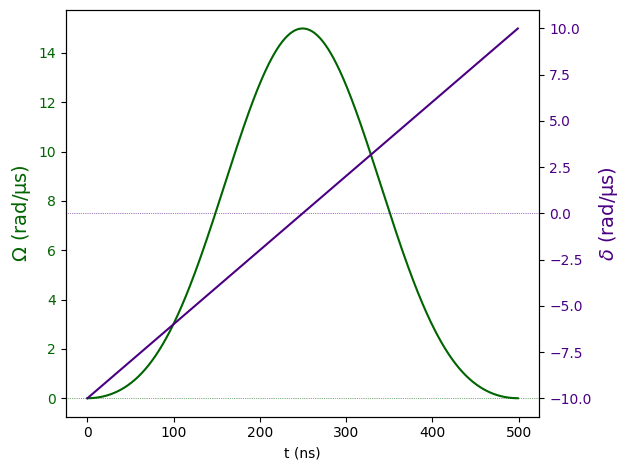
As an example, below is a 500 \(ns\) Pulse, with amplitude given by a BlackmanWaveform of area \(\pi\), detuning given by a RampWaveform from -10 to 10 \(rad/\mu s\) and a phase of \(\pi/2\).
In Pulser, Rabi frequency and amplitude are equivalent terms for \(\Omega\) and are used interchangeably.
In the same Pulse, the amplitude and detuning waveforms must have the same duration.
[1]:
import numpy as np
import pulser

pulse = pulser.Pulse(
    amplitude=pulser.BlackmanWaveform(500, np.pi),
    detuning=pulser.RampWaveform(500, -10, 10),
    phase=np.pi / 2,
)
pulse.draw()  # Draws the Pulse
Shortcuts for constant parameters
When the amplitude or detuning are constant, these class methods avoid having to use ConstantWaveform:
Pulse with a constant amplitude and a detuning waveform. |
|
Creates a Pulse with an amplitude waveform and a constant detuning. |
|
Pulse with a constant amplitude and a constant detuning. |
In
Pulse.ConstantAmplitude()andPulse.ConstantDetuning(), the pulsedurationis taken from theWaveformparameter.In
Pulse.ConstantPulse(),durationmust be explicitly given.
Below is an example of these methods in action, all of them creating the same 1000 \(ns\) pulse with \(\Omega=1~rad/\mu s\), \(\delta=-1~rad/\mu s\) and \(\phi=0\).
[2]:
import pulser

const1 = pulser.ConstantWaveform(1000, 1)  # A constant waveform of 1000 ns
pulse1 = pulser.Pulse.ConstantAmplitude(
    amplitude=1,  # float
    detuning=-const1,  # Waveform
    phase=0,  # float
)
pulse2 = pulser.Pulse.ConstantDetuning(
    amplitude=const1,  # Waveform
    detuning=-1,  # float
    phase=0,  # float
)
pulse3 = pulser.Pulse.ConstantPulse(
    duration=1000,  # int
    amplitude=1,  # float
    detuning=-1,  # float
    phase=0,  # float
)
assert pulse1 == pulse2 == pulse3
Tips for Pulse creation
Keep the Channel constraints in mind
Some Channel parameters dictate what is allowed in a Pulse once it’s added to the Sequence, so it is often useful to have these limitations in mind when first designing the Pulse. In particular, you should keep in mind:
Channel.max_abs_detuning, the maximum absolute value of detuning allowed;Channel.max_amp, the maximum amplitude allowed;Channel.min_avg_amp, the minimum average amplitude allowed (when not zero);Channel.min_duration, the minimum pulse duration allowed;Channel.clock_period, which dictates that every pulse’s duration must be a multiple of this value.
Remember that waveforms can be concatenated
When programming \(\Omega(t)\) and \(\delta(t)\) with Pulser, it’s usually preferable to divide these quantities into a stream of simple pulses. However, this is not always convenient, as the natural breaking point in the amplitude and detuning waveforms may not always match. In these cases, the CompositeWaveform allows for the creation of a more complex waveform by concatenation of multiple, smaller waveforms. Take a look a this page to
see how CompositeWaveform might help you.